




A practical guide to data center hardware refresh cycles, starting with storage and working up through storage systems, servers, and AI infrastructure to help determine when to refresh, redeploy, or retire assets.
For years, data center refresh cycles were discussed in simple calendar terms: three years, five years, perhaps longer for less demanding equipment. Today, different parts of the infrastructure stack reach their refresh point for different reasons. Some assets remain productive well beyond their original timeframe. Others face early pressure from new workload demands and changing support requirements.
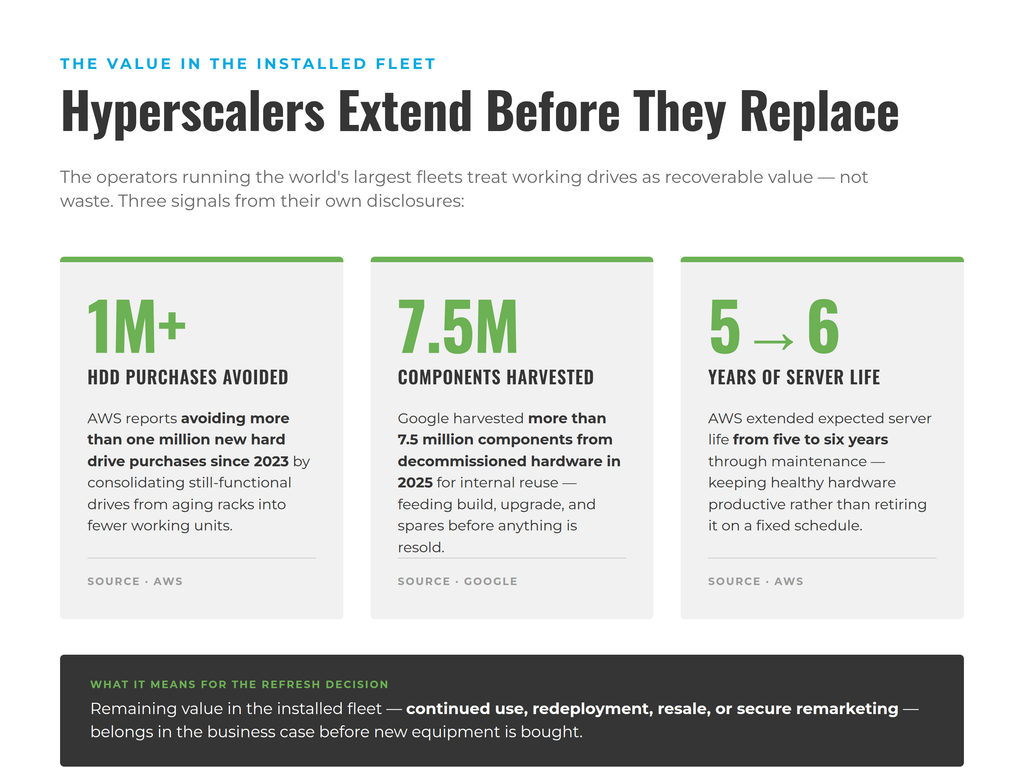
Current operator behavior reflects that shift. AWS says it has extended expected server life from five to six years through maintenance, while 2026 research based on Meta production environments describes hyperscale fleets operating multiple hardware generations simultaneously. Both point toward a more flexible model in which useful life depends on what the hardware can still deliver, rather than age alone.
Redefining the HDD Refresh Strategy
For HDD, an effective refresh strategy starts by asking what each layer of the storage infrastructure still needs to do, how reliably and efficiently it is doing it, and whether replacement would create more value than continued use.
Unlike processors or accelerators, which may be driven by rapidly changing performance requirements, storage devices are evaluated against a different set of considerations. A hard drive does not become obsolete simply because a higher-capacity model arrives. If it remains reliable and well matched to its workload, continued use may still make economic sense. A newer generation becomes compelling when gains in density and efficiency materially change the TCO equation.
Several questions help determine whether an HDD fleet remains the right fit for its workload:
- How is the fleet actually performing? Failure history, SMART or FARM telemetry, rebuild behavior, and intervention rates provide more useful evidence than age alone.
- Does the capacity still make economic sense? Higher-capacity drives can improve terabytes per rack and reduce the number of devices required for a given storage footprint, but the gain needs to justify migration and replacement costs.
- Does the workload still fit the media? Capacity-oriented workloads may continue to favor HDDs long after newer drive generations appear, while changing performance requirements may alter the balance.
- Can the drives remain supported and compatible? Firmware, sector format, and platform qualification can become constraints long before the media reaches end of life. Replacement availability matters too.
- What value remains in the installed fleet? Drives that no longer fit one environment may still have useful life elsewhere, making redeployment or remarketing part of the refresh calculation.
Rarely does a single metric determine the right time to refresh. The strongest decisions emerge when several independent signals begin pointing in the same direction.
SSDs Follow a Different Lifecycle
The same principles apply to solid-state storage, but the signals often look different. SSD refresh decisions are more likely to consider endurance, write activity, and latency requirements.
Enterprise SSD specifications make those differences explicit. Products get qualified for different endurance and workload profiles, with newer generations introducing faster interfaces and changing platform requirements.
Like HDDs, SSDs should still be evaluated against their operational role rather than a fixed replacement schedule. An SSD that continues to deliver the required performance, remains within its endurance limits, and is fully supported may not require replacement simply because a newer generation is available.
The broader principle remains the same: hardware should be refreshed when it is no longer the best fit for the workload it supports and the storage economics align.
Moving Up the Storage System
An individual drive is only one part of the storage environment. Even when the media remains reliable and well suited to its workload, the surrounding platform may eventually become the factor that determines the refresh decision.
Arrays, JBODs, controllers, and storage servers can each become the limiting factor at different times. Sometimes the drives are still doing exactly what they need to do, but the platform around them can no longer support the next capacity tier, firmware requirement, or expansion plan.
Current OEM documentation shows how specific those dependencies can become. Dell’s PowerVault ME5 guidance ties drive support to model, firmware, and sector format, while HPE advises operators to verify firmware compatibility across controllers and attached disk enclosures after upgrades or expansion.
That distinction becomes increasingly important as drive capacities continue to grow. A newer generation of HDDs may offer substantially greater density or improved energy efficiency, but those benefits can only be realized if the surrounding storage platform can recognize and support the media. In some cases, the refresh decision is driven less by the health of the installed drives than by the limitations of the platform around them.
The same principle applies in reverse. A storage system may continue to provide years of productive service even as individual drives are replaced over time. Well-managed platforms are often designed with that expectation, allowing media to be renewed while the surrounding infrastructure remains in operation.
In extending expected server life from five to six years, AWS reports saving more than one million HDD purchases since 2023 by consolidating functional drives from aging racks into fewer working units.
AI Has Split the Refresh Cycle
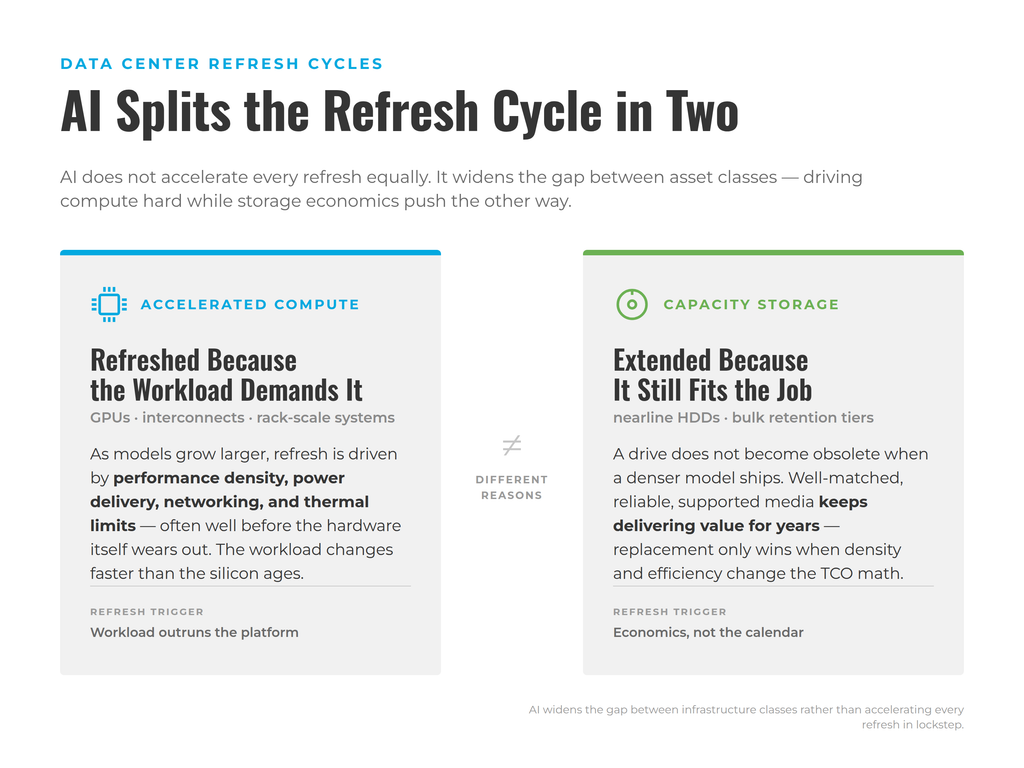
Artificial intelligence is often associated with faster infrastructure refreshes, but the reality is more nuanced. Rather than accelerating every part of the data center equally, AI is widening the gap between asset classes, with different technologies reaching their refresh point for different reasons.
Accelerated compute platforms are a clear example. GPUs, interconnects, rack-scale systems, and cooling architectures are all evolving quickly as AI models become larger and more computationally demanding. In these environments, refresh decisions may be driven by performance density, power delivery, networking, or thermal constraints as much as by the condition of the hardware itself.
Storage follows a different pattern, with AI generating larger datasets, longer retention periods, and greater demand for economical capacity. Those pressures make operators ask whether storage still fits the workload and can scale economically as demand grows. As a result, newer high-capacity drives may justify targeted refreshes in some environments, while well-managed storage infrastructure continues providing value elsewhere.
AI has not created one faster refresh cycle across the data center. It has simply widened the gap between different types of infrastructure. Compute may need replacing because the workload demands it, while well-managed storage can continue delivering value for many years.
When Should You Actually Refresh?
There is rarely one metric that determines the right time to refresh hardware. The strongest decisions emerge when several independent signals begin pointing in the same direction. A useful assessment starts with three questions:
Is the Hardware Still Doing Its Job?
Begin with workload fit. Does the asset still provide the capacity, performance, reliability, and availability required of it? Is it fully supported, or are firmware, software, security, and replacement parts becoming harder to maintain?
Age can inform those questions, but it cannot answer them. A mature platform that continues to perform reliably and remains well supported may still have years of productive life. Conversely, newer equipment can reach its refresh point quickly if the workload changes faster than expected.
HDD remains the storage workhorse of hyperscale computing. IDC estimates that roughly 89% of data stored by leading cloud service providers still resides on hard drives.
Would Replacement Materially Improve Energy Demands?
Newer hardware is almost always better on paper. What matters is whether those gains are large enough to change the equation in a useful way. For storage, that might mean substantially more capacity per drive, rack, or watt. For conventional servers, consolidation and performance per watt may matter more.
Recent generation-to-generation comparisons illustrate how large those gains can sometimes become. Dell reports just over 3x the performance per watt for its PowerEdge R7725 compared with a 14th-generation predecessor, while HPE models up to 7:1 server consolidation and 65% power savings in one Gen10-to-Gen12 scenario. These may be vendor-supplied comparisons, but the message remains clear.
Facility constraints may also strengthen that case. Uptime Institute’s 2026 survey identifies power availability, capacity forecasting, rising costs, and high-density AI workloads among operators’ growing concerns. When power, cooling, or rack capacity is scarce, retaining less efficient hardware carries an opportunity cost.
What Value and Risk Remain in the Existing Asset?
The final question looks beyond the replacement itself. What would it cost to continue operating the hardware, what would replacement cost after migration and implementation, and what intrinsic value remains in the asset?
That remaining value may come through continued use, internal redeployment, component harvesting, resale, or remarketing. For storage-bearing assets, it also depends on whether the media can be securely sanitized and moved through a documented disposition process. These considerations should enter the business case before a refresh begins, not after the new equipment arrives.
Typically, a refresh decision becomes compelling when the signals align: the workload is outgrowing the platform, reliability or supportability is deteriorating, and the economics favor replacement. When they do not, extending or redeploying the existing hardware may remain the better decision.
Google reports harvesting more than 7.5 million components from decommissioned hardware for internal reuse in 2025.
Justifying the Business Case
A refresh decision should account for what you are replacing and what you are taking out. If the outgoing hardware still has useful life or market value, that belongs in the business case before the new equipment is purchased.
The underlying economic principle is straightforward. DOE/FEMP lifecycle-cost guidance treats more efficient storage as cost-effective when lifetime energy savings exceed the incremental upfront cost. A full refresh calculation should widen that lens to include migration, maintenance, support, operational risk, and recoverable asset value.
The strongest refresh decisions are made when technical need and financial logic point in the same direction. If replacement solves a real constraint and creates a better lifecycle outcome after all costs and recoverable value are considered, the case is much easier to defend.
Better Lifecycle Decisions Start With Better Visibility
The right time to refresh hardware is rarely obvious from age alone. It becomes clearer when teams understand what the workload now requires and what value the equipment still holds.
That visibility makes it easier to separate genuine refresh needs from routine replacement. Some assets will justify modernization. Others will continue to deliver value through extension, redeployment, or remarketing.
The strongest lifecycle decisions come from seeing the infrastructure as a set of connected assets with different useful lives. Refresh becomes one possible outcome of that assessment, not the starting assumption.
Plan the next stage of your storage lifecycle with Horizon.