





Hard drives function via the complex coordination of intricate moving parts. Components such as the magnetic platters and actuator assembly operate in close proximity, requiring robust protection. The chassis plays the crucial role of physically protecting the delicate operation of a hard disk drive.
The chassis safeguards the HDD in two ways. Most obviously, it provides a secure place for its components to park. But it also helps to maintain an optimal internal environment, shielding parts against bumps, jolts, and dust that could negatively affect its operation.
Let’s take a look at what goes into HDD chassis design. We’ll discuss basic structure and form factors, before considering innovations such as ruggedized and Helium-filled HDDs.
What Goes into Chassis Design
Purpose of the Chassis
At its most general, “chassis” refers to a housing-frame that holds something in place and protects it. In the context of HDDs, it can mean either an HDD’s own protective casing, or a larger setup housing multiple drives, like a JBOD enclosure.
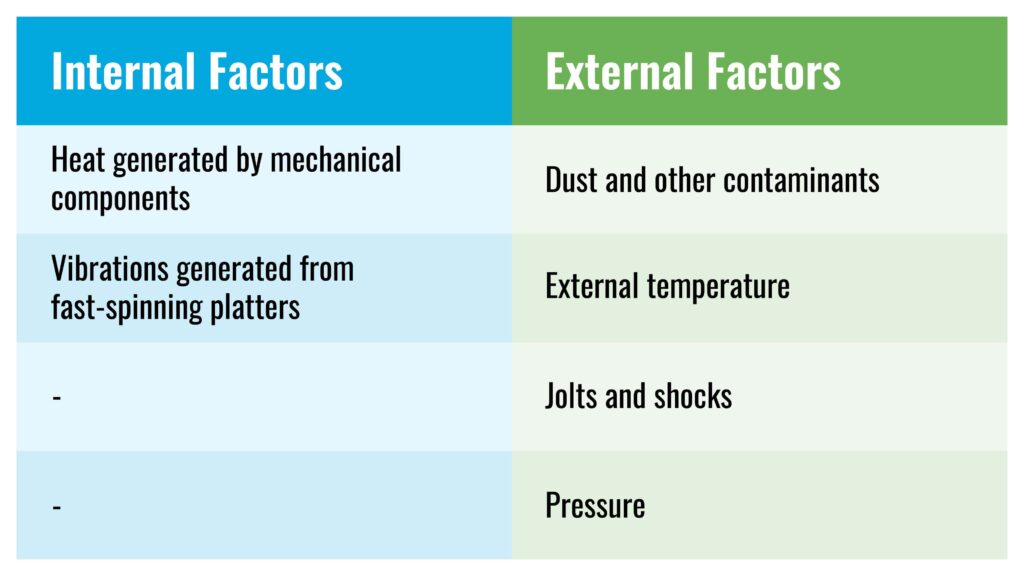
HDD storage technology relies on fine magnetically polarized grains to represent data, and on actuator arms and spindles to read/write and rotate these grains. The role of the chassis, then, is to safeguard components of an HDD, especially the moving parts, from internal and external factors which could lead to damaged media or head crashes.
Protection by Design
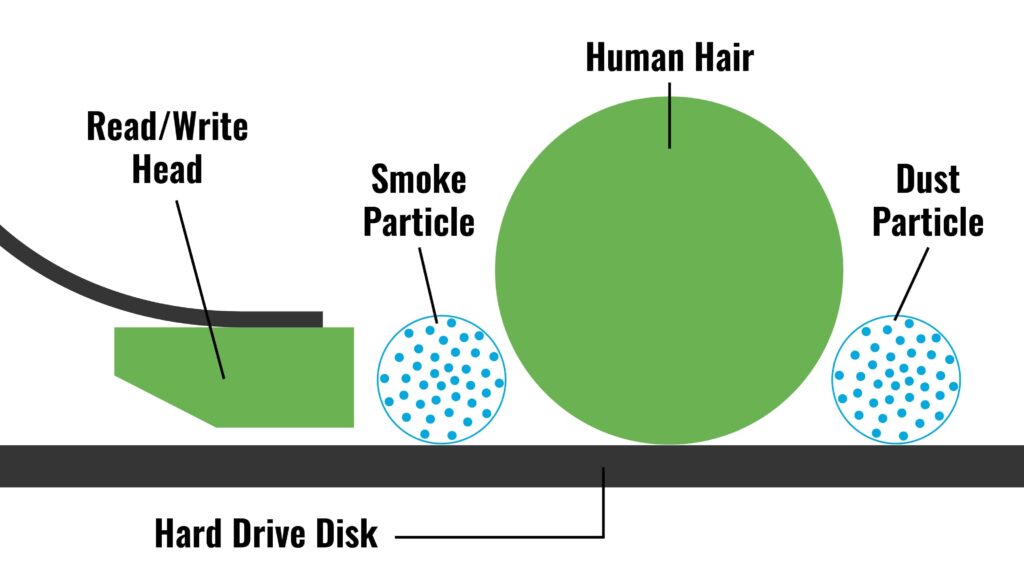
The chassis frame is either made of metal, plastic or some other reinforced material to protect against bumps and shocks. The protective casing must also keep out contaminants such as dust and moisture that disrupt its operation. This is particularly important because the read/write head operates only a few nanometers away from the platters, where even a small particle can mean trouble.
Depending on the application, different levels of protection are required from a chassis. Accordingly, manufacturers must consider a drive’s operating environment. An internal HDD is clearly in a different setting than an external HDD, and an HDD used as part of a server isn’t exposed to the elements in the same way as a photographer’s ruggedized portable HDD.
A balanced internal temperature is also important for optimal HDD operation. Platters spinning at extremely high-speed in close proximity to other components can cause the temperature to rise, increasing chances of a head crash. In regular HDDs, the chassis must facilitate heat dissipation, while larger enclosures might add fans as part of the assembly for this purpose. In the case of helium-filled drives, the chassis must be sealed to prevent gas leakage.

Related Reading
Read/write heads fly within nanometers of a drive’s magnetic disks. While the chassis can keep out contaminants, the longevity and speed of a hard drive also depends heavily on the design of the actuator assembly.
The Right Size: Form-Factors
The “form factor” refers to the diameter of the HDD platters. Typically measured in inches, the form factor indicates the drive’s compatibility in size with chassis/enclosure.
Two form factors dominate modern HDDs: 2.5 inch and 3.5 inch. The 2.5 inch, also known as the small form factor, is usually found in devices like laptops and notebooks.
Due to their use in portable devices, chassis for 2.5 inch HDDs are designed with higher durability. They may include built-in accelerometers that counter drops and vibrations by safely parking the read/write head. However, 2.5 inch HDDs are increasingly being phased out by SSDs.
Larger 3.5 inch drives, on the other hand, still find wide application in enterprise and hyperscale operations due to their high capacity and low price compared to SSDs.
Older form-factors like the 5.25 inch and 1.8 inch have become obsolete. In the case of SSDs, the form-factors (eg. M.2 SATA) differ from HDDs, since they lack moving parts and the spinning platters. However, external drive sizes remain similar for both HDDs and SSDs.

Related Reading
When it comes to smooth operations, hard drive spindles and their fluid bearings play a key role in improved stability at high rotation speeds.
Tough Tech: Ruggedized Drives
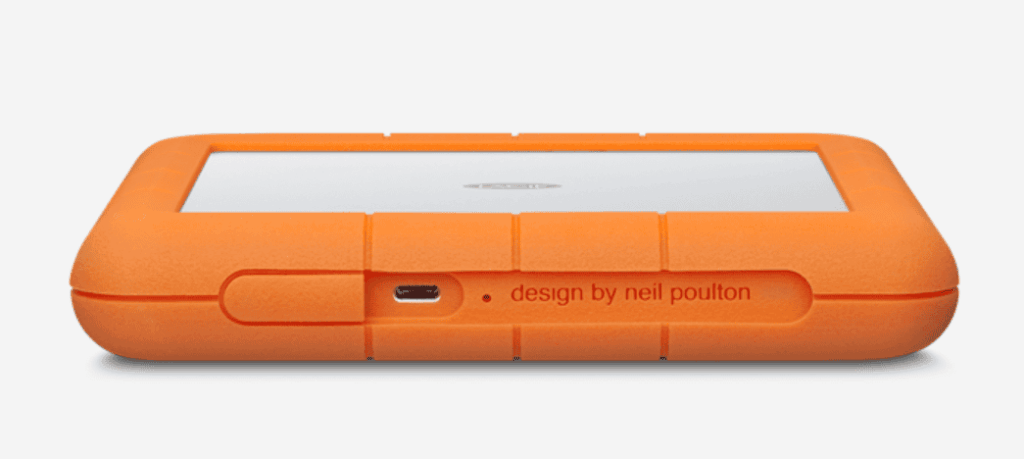
Ruggedized HDDs feature extra-durable chassis built to withstand tough environments. With a broader range of defense from moisture, pressure, and temperature, including break/crush resistance and extra features to manage shock and vibrations, ruggedized HDDs perform steadily under rough conditions.
Seagate’s rugged HDDs, like the LaCie Rugged RAID Shuttle 8 TB, provide drop resistance up to 1.2 meter, protection from rain, and can withstand up to 1 ton of pressure. Designed for application in demanding settings like film sets, photo shoots and music studios, they also include safety features like encryption and password protection.
Rugged options are available for both HDD and SSD. With no moving parts, ruggedized SSDs outperform HDDs in durability and performance, though HDDs continue to have the lowest $/TB.

Related Reading
In addition to allowing for areal density gains, careful platter design boosts drive durability by preventing breaks.
Helium-Filled Drives
There are few ways to increase HDD capacity. One way is to store more data on the platters by increasing areal density, and another is by adding more platters. Higher storage capacity also demands better overall HDD performance as there is more data to process.
This presents a number of challenges. First, higher areal density demands greater protection of the platters, since there are more magnetic bits in smaller platter areas. Second, adding more platters in the limited space of an HDD chassis requires that other component parts, such as the actuator assembly, become smaller in size. More disks and thinner components result in increased vibrations.
All these challenges can be tackled by filling the HDD with Helium, which is 1/7th the density of air. As the second lightest element with lower density, Helium reduces drag on spinning platters, cutting vibration and power use. This also means lower heat generation and ease in track-seeking for the read/write head, ensuring quicker and smoother operation.
However, sealing Helium inside the HDD is tricky. As a low-density element, it is highly prone to diffusion through most materials and companies use sophisticated vacuum-sealing techniques to contain it within the drives. Unlike standard HDDs that use filters to control air-circulation, Helium drives allow OEMs to up the platter count from 6 to 10 or more.
The idea of Helium-filled drives has been around since 1970 but it was only in 2013 that HGST shipped the first Helium drive, the Ultrastar He6. It housed 7 disks and came in a 3.5 inch form factor at 7200 rpm. While disk thickness shrank from 1.27mm to 0.635mm, Toshiba reached 9 disks by 2018. Today, their use is widespread, with most high-capacity enterprise applications favoring Helium-filled drives for their superior storage and performance.

Related Reading
There’s more to hard drive history than design innovation. Over time, new protocols and sanitization methods have done much to enable hard drive reuse.
Putting the Hard in Hard Drive
The term ‘chassis’ can either refer to a single HDD housing or an enclosure housing multiple drives. In either case, the chassis acts as the primary defense for the HDD components, ensuring consistent performance by mitigating the impact of external conditions. It also manages the internal environment, safeguarding data integrity, averting malfunction and failure.
The chassis design differs in features and durability depending on the application. An internal HDD chassis handles basic operational challenges, while a rugged HDD takes it to the next level with its enhanced protection. Larger external enclosures provide additional features and safeguards.
Variations in chassis design can affect compatibility between the HDD and the housing. Meanwhile, advanced technologies in sealing the chassis body make helium-filled drives possible and help push the boundaries of storage capacity, precision and performance.
Contact Horizon to see how you can procure cost-effective hard drives for all your data center needs.