




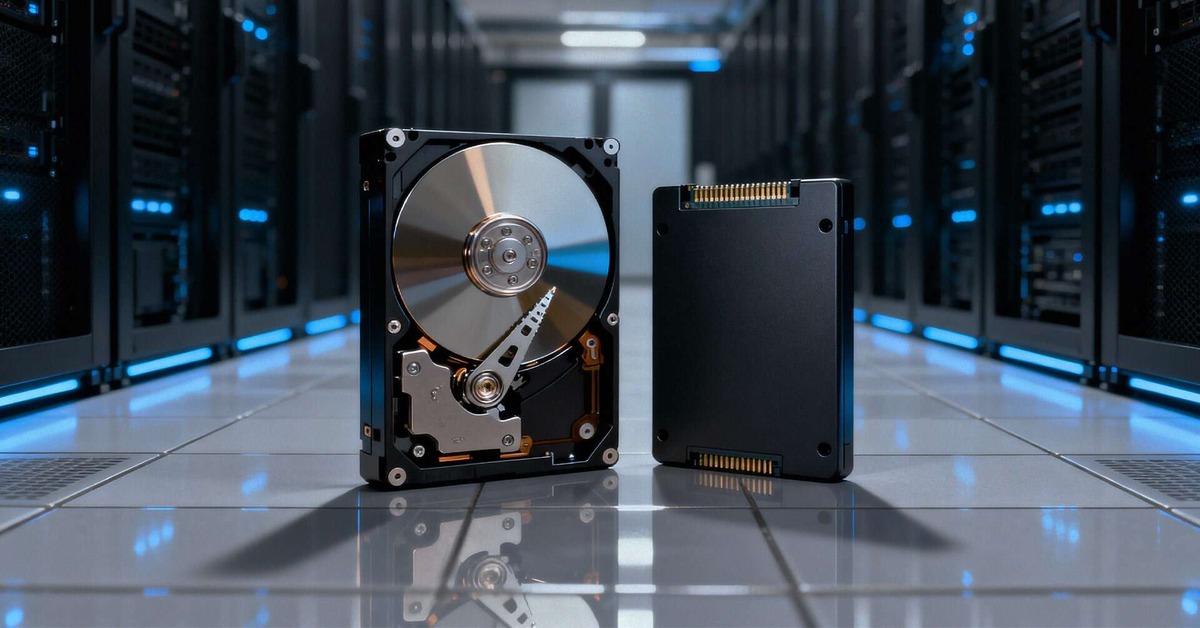
The continued surge in data generation, projected to hit 181 zettabytes of data generation worldwide in 2025 alone, is putting enormous pressure on storage infrastructure. It is also intensifying a face-off between nearline HDD and QLC SSD. Since a great deal rides on storage decisions during the current AI boom, there has been fierce debate over the Total Cost of Ownership (TCO) of various storage solutions.
TCO comparisons often suffer from oversimplification, with issues framed as a zero-sum battle between HDD and all-flash. Hard drive advocates point to low acquisition costs, while SSD proponents focus on density and power savings at scale. However, a great deal hinges on the workloads in question. For instance, storage for archiving and for real-time analytics demand very different things from storage hardware. This calls for a shift from simple drive-to-drive comparison to a solution-to-solution analysis that factors in intended use and the nature of the data in question.
To cut through the noise, we need to look at some key variables that form perpetual points of dispute in TCO debates. We then offer a blow-by-blow of recent industry debates on the topic, examining arguments around power metrics, data reduction efficacy, and compute reduction. The result is a clear picture of the conditions under which Flash achieves TCO crossover, and where HDD has an enduring advantage.
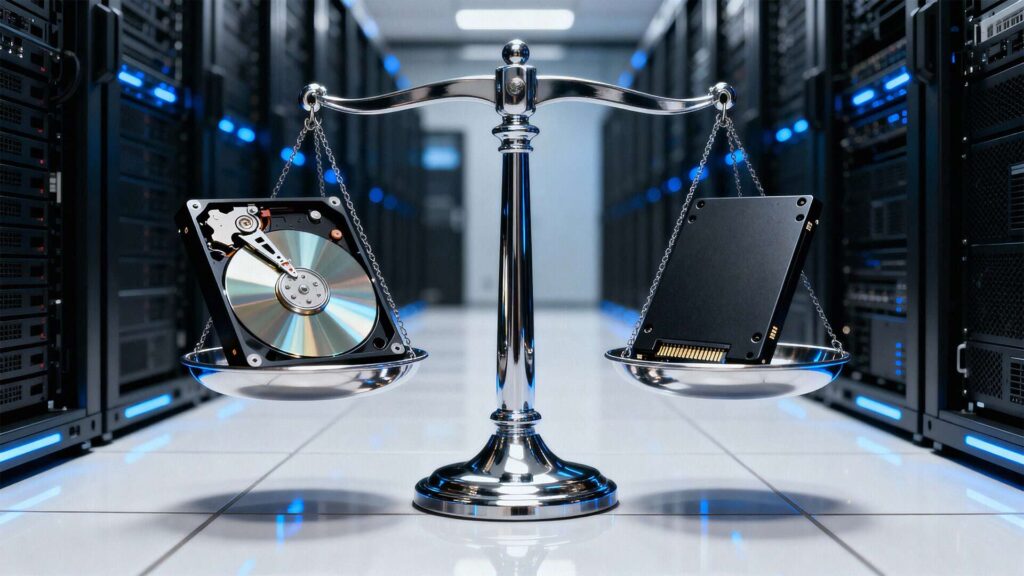
Core TCO Variables
Several factors shape storage total cost of ownership. The most obvious factor is the price of the drives themselves. Power usage also matters: drives need juice to run, and that costs money. And don’t forget the cost of HVAC and cooling overhead.
But the drive prices and power costs only tell you about TCO in theory. To understand TCO in practice you need to look at the bigger picture.
Acquisition Costs (CapEx)
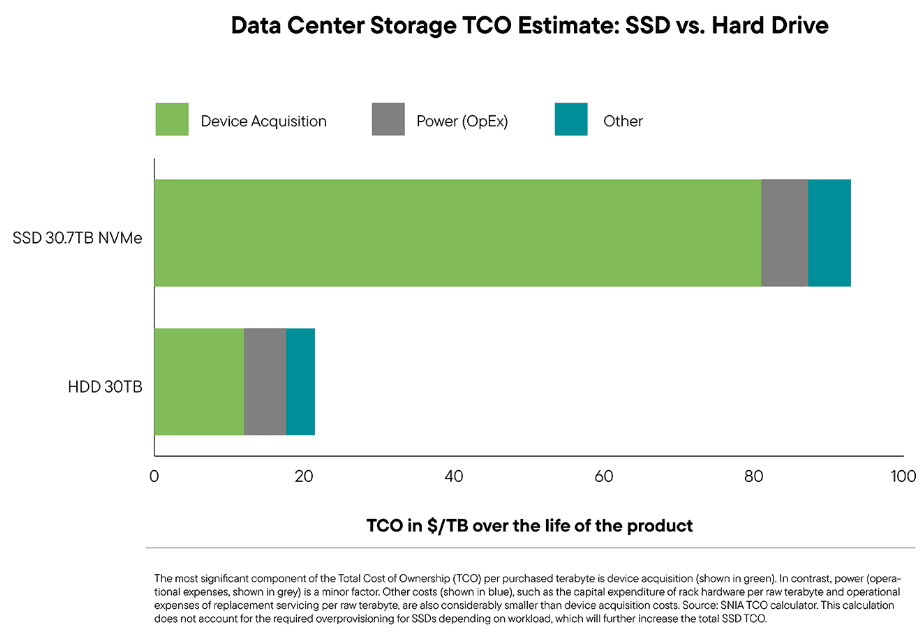
Drives cost money. Proponents of HDD are quick to point out that SSDs have a premium of up to 6:1 over disks. However, even with acquisition, there’s a lot to consider: what additional data center hardware is needed to make the drives function optimally, and how much does this add to the cost?
Power Costs
While individual HDDs have lower active power, flash proponents are quick to point out that SSD lets you do the same with fewer drives. Power questions aside, there’s a question of how savings in power compare to savings in acquisition.
Density
Space is another cost that can creep up on your TCO. Real estate for racks is pricey. Packing more drives in less space can reduce these costs, and denser drives enable more compact arrangements.
Reduction
Certain solutions allow for various forms of reduction, from data reduction that lets you store more with less, to the compute reduction and associated host-side savings that come from treating several drives as a single logical unit. Often overlooked, the role of reduction is one reason TCO comparisons are so workload specific.
Longevity & Maintenance
How often do you swap your storage devices? The length of your refresh cycle directly affects TCO. While a longer cycle means acquisition costs occur less frequently, outdated tech could hike costs in the future.
Making Comparisons
Most TCO debates either revolve around the direct comparison of specific factors, such as the price of a drive, or the amount of power a drive consumes. While easier to measure, these miss out on workload specific factors that make a real difference. Per-TB comparisons are more nuanced, but still fall short.
Related Reading
Factory recertified drives are as good as new. They also help procurement teams reduce acquisition costs.
Navigating Procurement Strategies for Factory Recertified Drives
Three Common Flaws in TCO Comparisons
TCO comparisons should be as simple as possible—but not simpler! Here are some common simplifications that occur when measuring TCO.
Power Comparisons: Drive to Drive and Fleet to Fleet
It’s tempting to use drive-to-drive power comparisons, because it’s relatively easy to measure. HDD defenders often do this, though most are quick to add that it depends on workload. For instance, Paul Speciale, Scality’s chief marketing officer discusses in an interview how QLC flash consumes 5W (idle) and between 15 (read) to 20W (write) while active, compared to 7W idle and 9.4W max for a Seagate drive.
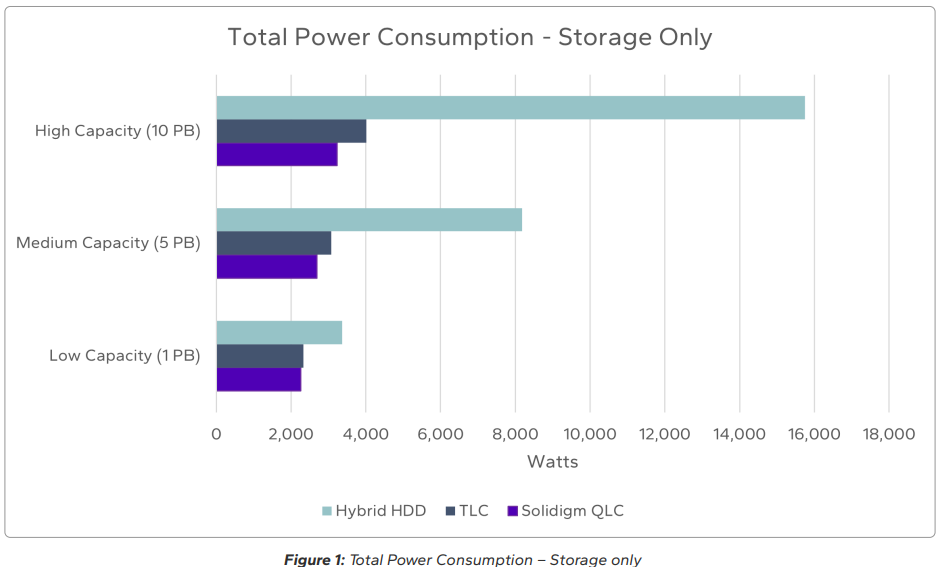
However, there’s more to it than workload variation; scale matters. For example, a study by flash manufacturer Solidigm argues that by consolidating data in fewer drives, relative power savings increase with capacity.
Compression
Even if Solidigm turns out to be right about power consumption, it’s provided some simplifications of its own. The firm claims that due to required overhead for data protection and metadata, 1EB of data needs 1.25 EB of HDD capacity. But when you use Solidigm’s devices with VAST Data’s 2.5:1 deduplication/compression, you can get away with just .456 EB of actual SSD capacity. Neat, right?
Not so fast. Leaving aside the fact that bringing in VAST makes this a solution-specific comparison, this assumes zero prior compression. That’s a pretty unrealistic assumption for some types of data, such as video storage. The moral: when taking compression claims into account for TCO comparisons, always think about the type and compressibility of the data in question.
Compute Savings
The Solidigm study compared its own QLC SSDs, running on VAST Data architecture, with Seagate HDDs. VAST Data’s architecture allows for potentially significant data reduction. But Seagate HDDs can benefit from a competing architecture: Seagate’s Corvault. OS Nexus CEO Steve Umbehocker points out that by letting you treat four 30TB HDDs as a 120TB logical unit, Corvault significantly cuts down on host-side compute overhead. It also incorporates erasure coding and data protection internally, reducing host-side OpEx.
Related Reading
Longevity matters. For HDD owners, the clear trend has been towards longer refresh cycles that save on CapEx and increase sustainability.
The TCO Crossover: When Does Flash Win?
When it comes to speed and throughput, no one disputes flash supremacy. But this level of performance simply isn’t required for many workloads. HDD OEM Seagate has argued, based on its analysis of IDC’s May 2023 Global DataSphere report, that 90% of workloads are general purpose and require only nominal data transfer time. Of course, even if SSD’s performance isn’t necessary, if SSD turns out to have lower TCO anyway, the performance boost is a harmless bonus.
SSD TCO arguments often center around their density, leveraging it to defuse arguments from HDD’s lower per-TB acquisition and power costs. We’ve already seen how density figures in Solidigm’s insistence that SSD power savings grow as solutions scale. But it can also help on the acquisition side: SSDs can be pricier per-drive and per-TB, but cheaper per-rack. By fitting far more TB within a single chassis, SSD can reduce costs for cooling, network cards, and labor costs for setup.

For Chris Mellor of Block & Files, this line of thought has made him increasingly optimistic on the prospects of SSD overtaking HDD as a data center standard in the long-term. Comparing a 12RU x 12-slot disk drive chassis with a 2RU x 24-slot SSD enclosure from Supermicro, he calculated that you can get 22.8 more capacity within the same amount of space.
As far as workloads go, SSD will continue, for the foreseeable future, to give an edge in high-frequency AI/ML model training where delays lead to host-side compute wait time and lost revenue. Paired with solutions like VAST Data, it can also offer significant power savings in cases where incoming data isn’t already compressed and deduplicated.

Related Reading
Packing in multiple bits-per-cell means that QLC has known issues with write endurance. However, this can vary a lot depending on the type of I/O in question.
The Endurance of HDD: When Does Disk Retain TCO Leadership?
HDD manufacturer Seagate is quick to remind consumers of the price-per-TB disadvantage of SSD, which it believes will remain at or above a 7:1 premium through at least 2027. As for power costs, the firm says that this is a secondary concern: power is a mere fraction of the acquisition costs, which should remain center of attention.
There’s also longevity to consider. While conventional wisdom has it that SSDs outlast HDDs due to their lack of moving parts, the reality is more complicated. Data from Backblaze, for instance, shows the annualized failure rates of HDD are much lower than they once were:
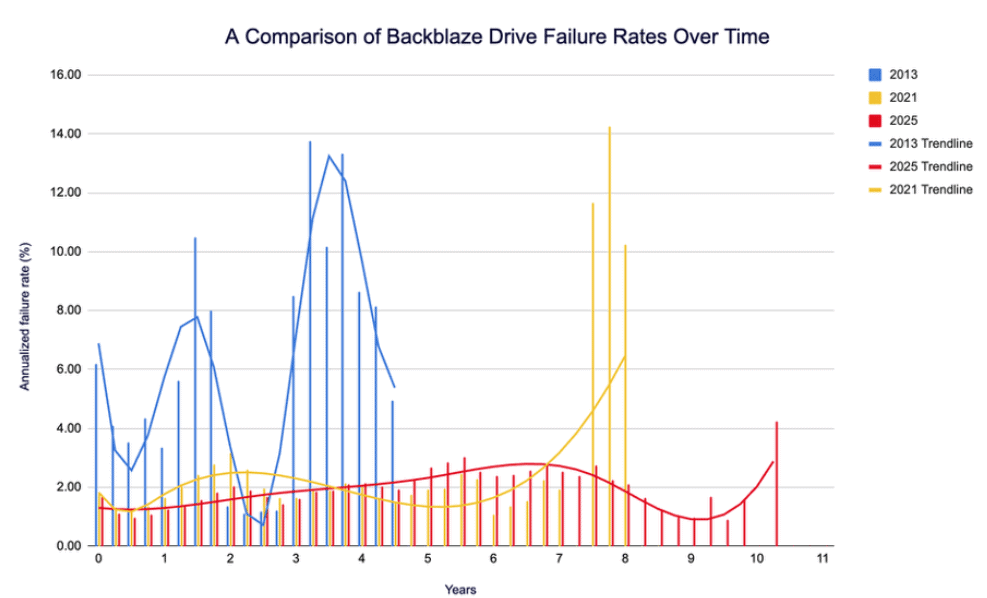
A recurring theme in criticisms of Solidigm’s pro-SSD TCO comparison is that they are incorrect in assuming a 3-4 year refresh cycle, when the industry norm is closer to 5-6 years. Add to this the fact that packing multiple-bits per cell (QLC) can affect raw SSD endurance, and the fact that HDDs (including factory recertified ones) often come with generous warranties, and spinning media begins to look much more attractive.
As for workloads, HDDs are particularly cost-effective for cold storage, and for workloads involving sequential writes and pre-compressed data where data reduction techniques aren’t that big a help. Add to it the potential for saving on host-side compute, and HDDs win out for many tasks.

Related Reading
Hard drive TCO isn’t an immutable fact of life. From strategic procurement to careful tiering, there are several ways to reduce the cost of spinning media.
How to Lower Total Cost of Ownership (TCO) for Hard Drive Storage
Other Things to Think About
Balancing the SSD vs. HDD arguments may come down to contingent factors such as drive availability or market conditions.
Production matters
A lot rides on the ability of HDD manufacturers to meet surging demands. TrendForce reports that OEMs, driven by AI needs, are currently struggling to meet demand for nearline HDDs. This supply constraint could lead to increased investment in and shipments of QLC NAND by 2026.
Density Matters
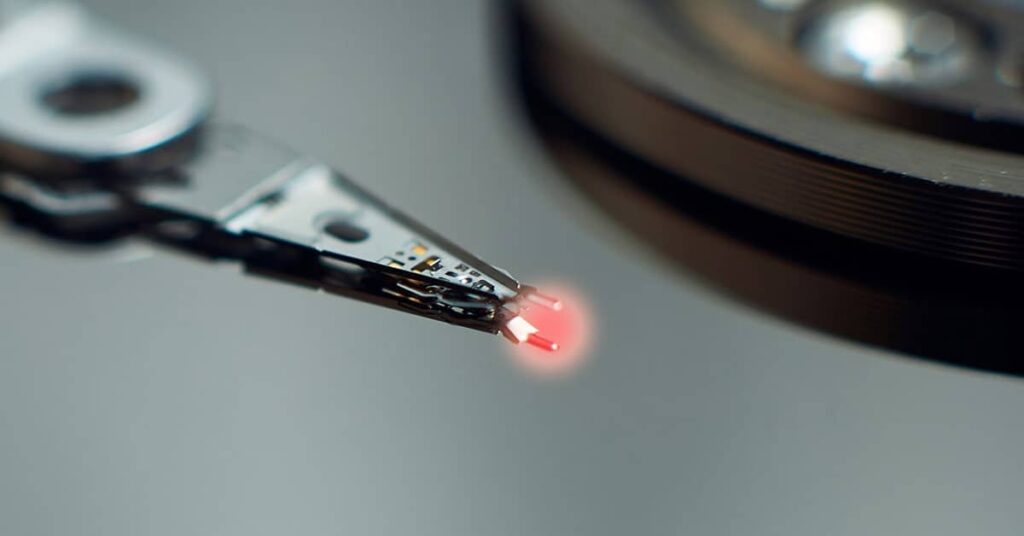
HAMR (Heat Assisted Magnetic Recording) is key to the long-term prospects of HDD. By enabling increased areal density, it plays a crucial role in keeping cost-per-TB down in the long term. Mass-produced HAMR drives are now in the channel, and how they fare may be a good indication of the future of HDD markets.
Procurement matters
Smart buying can also help. There’s a thriving market for factory recertified HDDs out there, making it possible to find reliable drives economically. Valued at $338 million in 2025, the refurbished drive market is only expected to grow.
Hybrid options
HDD or SSD? VDURA (formerly Panasas) answers “Why not both”? Its white paper outlines a hybrid storage system: QLC NAND flash like Phison Pascari 128TB paired with 30+ HDDs. The firm estimates that the solution reduces TCO by 60% compared to flash-only competitors.
Related Reading
At long last, HAMR has hit the global channel in force. Can HDD OEMs keep up with long-term demand while continuing to increase areal density?
Workloads Are Everything
In the end, there is no single winner of the HDD vs. SSD TCO debate. The arguments boil down to the specifics of workload requirements. While HDDs keep acquisition costs low for massive data archives, SSDs excel in energy-heavy, tight-space AI workloads.
We’ve covered the key factors, from acquisition and power cost comparisons to the savings derived from reductions in required capacity or host-side compute. Here, HDDs have an edge in upfront acquisition cost for high capacity needs. But factors like power consumption and rack density favor SSDs.
Rather than depending on generalized claims and drive-to drive comparisons, TCO savings go to those able to make a fine-grained analysis based on specific workloads. That’s where you come in: no one knows your current data center costs better than you. Ultimately, the number that affects your bottom-line is cost-per-task, and only you know what tasks you want to do, and what metrics can best approximate doing so cheaply.
Get in touch with Horizon Technology for expert support managing your hard drive TCO, from enclosure solutions to its best-in-class program for factory recertified drives.